Introduction to AI Music Video Creation
Understanding the revolution in music video production.
Music videos have long been essential for artists to connect with audiences and promote their work. However, traditional music video production typically requires significant resources—professional equipment, technical expertise, and substantial budgets. AI technology has fundamentally changed this landscape, democratizing music video creation and making it accessible to independent artists and creators of all levels.
AI music video generators analyze your audio track and create synchronized visual content that complements your music. These tools can produce professional-quality videos in minutes rather than days or weeks, at a fraction of the cost of traditional production methods.
In this comprehensive tutorial, we'll explore the process of creating compelling music videos using AI tools, with a focus on Compeller.ai—our recommended platform for audio-reactive video generation. Whether you're a musician looking to promote your latest track, a content creator seeking to enhance your videos with music, or a curious explorer of AI creativity, this guide will provide you with the knowledge and techniques to create stunning music videos.
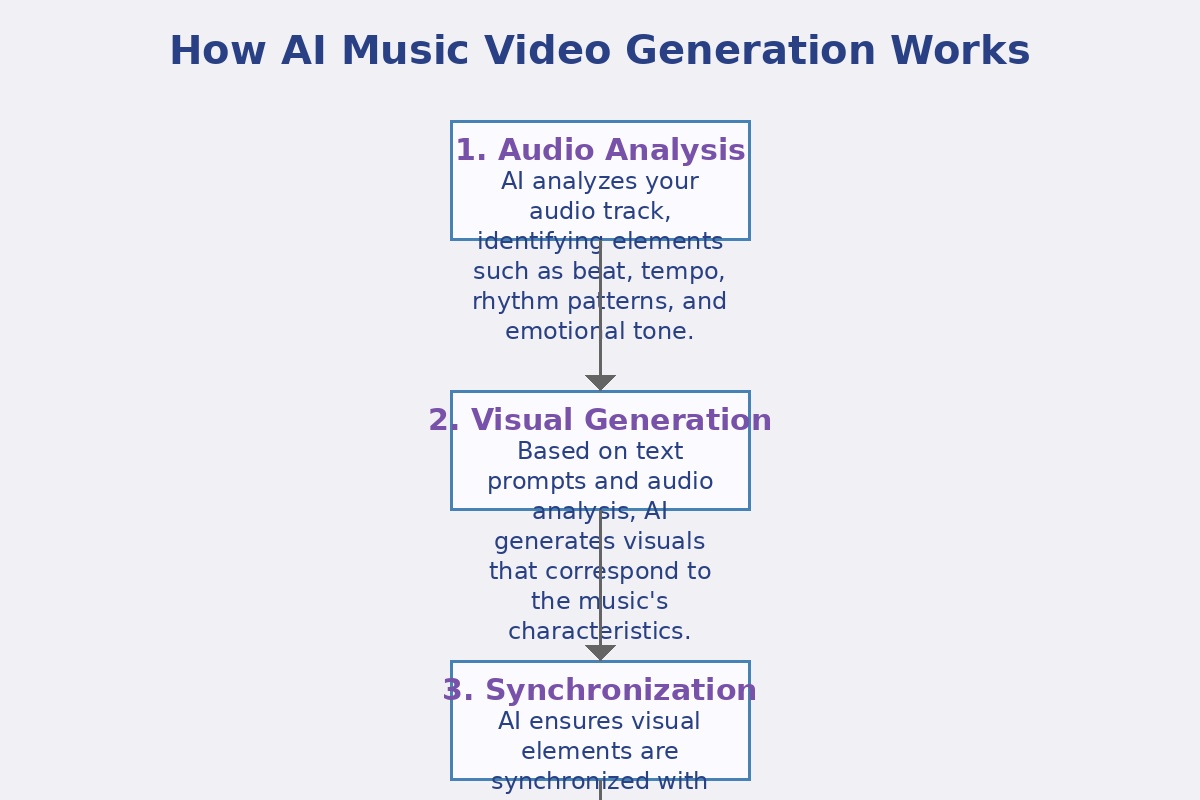
Why Use AI for Music Videos?
AI music video creation offers several advantages over traditional methods: significantly lower costs, faster production time, no need for specialized equipment or technical skills, perfect synchronization with your audio, and the ability to experiment with multiple visual styles quickly.
Preparing Your Audio for AI Video Generation
Setting up your music track for optimal results.
Before diving into the video creation process, it's important to prepare your audio track properly. The quality and characteristics of your audio will significantly impact the resulting video, as AI tools analyze various audio elements to generate synchronized visuals.
Audio Quality Considerations
For the best results, your audio track should be:
- High quality: Use a high-quality audio file (WAV or high-bitrate MP3) to ensure the AI can accurately analyze all audio elements.
- Well-mixed: Ensure your track has good balance between instruments and vocals, with clear definition of different elements.
- Properly mastered: A professionally mastered track with appropriate dynamic range and frequency balance will yield better visual results.
- Free of unwanted noise: Remove any background noise, clicks, or pops that might confuse the AI analysis.
Identifying Key Moments
Before uploading your track, listen through it carefully and note the timestamps of key moments that you want to emphasize visually:
- Intro and outro sections
- Verse-chorus transitions
- Dramatic drops or builds
- Solo sections or instrumental breaks
- Emotional peaks in the composition
While AI tools will automatically detect many of these moments, being aware of them yourself will help you make better decisions when configuring the visual style and parameters.
Optimal Track Length
Most AI video generators work best with tracks between 1-5 minutes long. Very short tracks may not provide enough data for the AI to create varied visuals, while very long tracks might result in repetitive visuals or exceed platform limitations.
If your track is longer than 5 minutes, consider creating a shorter edit for your music video, focusing on the most engaging sections.
File Format Compatibility
Compeller.ai supports common audio formats including MP3, WAV, AIFF, and FLAC. For the best balance of quality and file size, we recommend using MP3 files at 320kbps or WAV files at 16-bit/44.1kHz.
Step-by-Step Guide to Creating AI Music Videos
A detailed walkthrough using Compeller.ai.
Now that your audio is prepared, let's walk through the process of creating a music video using Compeller.ai:
Create an Account
Visit Compeller.ai and sign up for a free account. The platform offers a forever free tier that allows you to create videos with basic features.
After signing up, verify your email address and log in to access the dashboard.
Upload Your Audio Track
From the dashboard, click on "New Project" or "Create Video" to start a new music video project.
Upload your prepared audio file by clicking on the upload area or dragging and dropping your file. The platform will begin processing your audio, analyzing its structure, rhythm, frequency spectrum, and emotional characteristics.
Tip
While your audio is uploading and processing, you can start exploring visual style options to save time.
Choose a Visual Style
After your audio is processed, you'll be presented with visual style options. Compeller.ai offers various style categories including:
- Abstract: Geometric shapes, particles, and patterns that respond to your music
- Cinematic: Film-like visuals with scenes and environments
- Visualizer: Classic audio visualization effects enhanced with AI
- Artistic: Stylized visuals inspired by various art movements
- Thematic: Content based on specific themes like nature, urban, space, etc.
Browse through the available styles and select one that complements your music genre and emotional tone. You can preview how different styles might look with your specific track.
Customize Visual Parameters
After selecting a base style, you can customize various parameters to fine-tune the visual output:
- Color Palette: Choose colors that match your brand or the mood of your track
- Motion Intensity: Adjust how dramatically the visuals respond to audio changes
- Visual Complexity: Control the level of detail in the generated visuals
- Transition Style: Define how the visuals transition between different sections of your track
- Beat Reactivity: Adjust how strongly the visuals react to beats in your music
Take time to experiment with these settings, as they significantly impact the final result. Compeller.ai provides real-time previews of how parameter changes affect the visuals.
Advanced Customization
Premium tiers of Compeller.ai offer additional customization options, including text overlays, logo integration, and scene-specific adjustments. These features are particularly useful for creating branded content or videos with lyrics.
Generate Your Video
Once you're satisfied with your style and parameter selections, click "Generate Video" to start the creation process. Compeller.ai will render your music video, which may take several minutes depending on the length of your track and the complexity of the visuals.
The platform provides a progress indicator so you can track the generation process. You can leave the page and return later; you'll receive an email notification when your video is ready.
Preview and Refine
Once generation is complete, you'll be able to preview your music video. Watch it carefully, paying attention to how well the visuals synchronize with your audio and whether they effectively enhance the emotional impact of your music.
If you're not completely satisfied with the result, you can:
- Adjust parameters and regenerate the video
- Try a different visual style
- Generate multiple versions and compare them
Tip
Don't be afraid to generate multiple versions with slightly different parameters. Sometimes small adjustments can significantly improve the result, and comparing versions side by side helps identify the most effective approach.
Export and Download
When you're satisfied with your music video, export it in your preferred quality and format. Compeller.ai offers various export options:
- Resolution: From 720p to 4K (depending on your subscription tier)
- Format: MP4, WebM, or other formats optimized for different platforms
- Quality: Standard to high bitrate options
Choose the appropriate settings based on where you plan to share your video. For social media, standard HD (1080p) is usually sufficient, while for professional showcases or music platforms, you might prefer higher quality options.
After configuring export settings, click "Export" and download your completed music video.
Advanced Techniques for Professional Results
Taking your AI music videos to the next level.
Once you're comfortable with the basic process, you can explore these advanced techniques to create even more impressive music videos:
Style Mixing and Transitions
Instead of using a single visual style throughout your video, consider creating different sections with distinct styles that match the changing mood of your track. For example, you might use a more subdued style for verses and a dynamic, energetic style for choruses.
To achieve this with Compeller.ai:
- Create separate projects for different sections of your track
- Generate videos with different styles for each section
- Export each section separately
- Use basic video editing software to combine the sections with smooth transitions
Incorporating Text and Lyrics
Adding lyrics or text elements can enhance your music video, especially for tracks with meaningful lyrics or storytelling elements. Compeller.ai's premium tiers allow you to add text overlays directly in the platform, with options for font, size, color, and animation style.
For the most professional results:
- Time text appearances precisely with vocal lines
- Use fonts that complement your visual style
- Keep text readable by using contrasting colors or subtle background elements
- Animate text entries and exits to match the rhythm of your music
Branding and Artist Identity
Incorporating your artist branding into your music videos creates a consistent visual identity across your content. Consider adding:
- Your logo or artist name at the beginning and end of the video
- A consistent color palette that matches your brand identity
- Visual motifs or elements that appear across multiple videos
- Social media handles or website information in the closing frames
Compeller.ai allows logo uploads and custom color palette selection to maintain brand consistency.
Combining AI-Generated Content with Real Footage
For a hybrid approach that leverages both AI creativity and traditional video elements, consider:
- Using AI-generated visuals as background elements behind performance footage
- Alternating between real footage and AI-generated sequences
- Applying AI-generated effects or overlays to enhance real footage
- Creating picture-in-picture effects with AI visuals in one layer and real footage in another
This approach requires basic video editing skills but can result in uniquely compelling videos that stand out from purely AI-generated content.
Experiment with Aspect Ratios
Different platforms require different aspect ratios for optimal viewing. Compeller.ai supports various aspect ratios including 16:9 (landscape), 9:16 (vertical for Stories/Reels), and 1:1 (square for Instagram feed). Consider generating multiple versions of your video in different aspect ratios for cross-platform sharing.
Optimizing Your Music Video for Different Platforms
Ensuring your video performs well across social media and streaming services.
Different platforms have different requirements and audience expectations. Here's how to optimize your AI-generated music videos for maximum impact:
YouTube
As the primary platform for music videos, YouTube requires specific considerations:
- Resolution: Export at 1080p or 4K for best quality
- Aspect Ratio: Standard 16:9 landscape format
- Thumbnail: Create a custom thumbnail from a visually striking moment in your video
- End Screen: Leave 20 seconds at the end for YouTube end screens with links to other content
- Description: Include track information, links, and relevant keywords
Instagram offers multiple formats for sharing music videos:
- Feed: Square (1:1) or landscape (16:9) format, maximum 60 seconds
- IGTV: Vertical (9:16) format, can be longer form
- Reels: Vertical (9:16) format, maximum 60 seconds, optimized for quick engagement
- Stories: Vertical (9:16) format, 15-second segments
Consider creating shorter, more visually impactful edits specifically for Instagram, focusing on the most engaging sections of your track.
TikTok
For the short-form video platform:
- Duration: 15-60 seconds, focusing on the most catchy part of your track
- Aspect Ratio: Vertical (9:16)
- Visual Impact: Emphasize visually striking moments that grab attention in the first 3 seconds
- Text: Consider adding on-screen text that explains the context or encourages engagement
Music Streaming Platforms
For platforms like Spotify Canvas or Apple Music:
- Spotify Canvas: 3-8 second looping vertical video
- Apple Music: Standard music video format (16:9)
- Quality: High quality is essential as these platforms cater to music enthusiasts
Platform-Specific Versions
For serious promotion, consider creating platform-specific versions of your music video rather than using the same version everywhere. Compeller.ai's batch export features (available in premium tiers) make it easier to generate multiple versions with different aspect ratios and durations.
Case Studies: Successful AI Music Videos
Learning from effective examples across different genres.
Let's examine three examples of successful music videos created with AI tools, analyzing what makes them effective and how you can apply similar techniques to your own projects:
Case Study 1: Electronic Dance Track
An electronic producer created a video for their track "Digital Pulse" using Compeller.ai's abstract visualizer style. The video features geometric shapes and particles that pulse and transform in perfect synchronization with the track's driving beat and synth elements.
What Made It Successful:
- Color palette of neon blues and purples that perfectly matched the futuristic feel of the track
- High beat reactivity settings that created satisfying visual impacts on every beat
- Gradual increase in visual complexity that mirrored the track's build-up structure
- Strategic use of the artist's logo as a central element that transformed with the music
Takeaway: For electronic music, emphasize strong beat synchronization and use color palettes that reflect the energy and mood of your track.
Case Study 2: Acoustic Singer-Songwriter
A folk artist created a video for their ballad "Mountain Echo" using Compeller.ai's cinematic nature theme. The video featured evolving landscapes that subtly shifted with the gentle guitar picking and vocal phrases.
What Made It Successful:
- Warm, earthy color palette that complemented the organic sound of acoustic instruments
- Lower motion intensity settings that created a more contemplative, flowing visual experience
- Lyrics tastefully integrated as subtle text elements that appeared with key phrases
- Thoughtful transitions between scenes that aligned with verse-chorus structure
Takeaway: For acoustic or more intimate music, prioritize mood and atmosphere over intense visual activity, and consider incorporating lyrics as visual elements.
Case Study 3: Hip-Hop Track
A hip-hop artist created a video for their track "Urban Rhythm" using a combination of Compeller.ai's urban visualizer and custom footage. The video alternated between AI-generated cityscapes that pulsed with the beat and brief clips of the artist performing.
What Made It Successful:
- High-contrast color scheme that emphasized the bold, confident nature of the track
- Clever integration of real footage with AI-generated backgrounds
- Visual effects timed perfectly with vocal punchlines and beat drops
- Creative use of text animations that emphasized key lyrics and phrases
Takeaway: For hip-hop and rap, consider a hybrid approach that combines AI visuals with performance elements, and pay special attention to emphasizing lyrical content visually.
Additional Resources and Next Steps
Continuing your journey in AI music video creation.
To further develop your skills in AI music video creation, explore these additional resources:
Advanced Tutorials
Complementary Tools
Enhance your music video creation workflow with these complementary AI tools:
- AI Music Generators - Create original tracks to visualize
- AI Mixing & Mastering Tools - Optimize your audio before visualization
- AI Stem Splitters - Create visualizations for specific elements of your track
Community and Feedback
Join communities where you can share your AI-generated music videos and receive feedback:
- Compeller.ai's official Discord server
- Reddit communities like r/musicproduction and r/AIArt
- Music technology forums and social media groups
Next Steps in Your Learning Journey
As you become more comfortable with AI music video creation, consider these next steps:
- Experiment with combining multiple AI tools in your workflow
- Learn basic video editing to enhance and customize AI-generated content
- Develop a consistent visual style across multiple videos to strengthen your artist brand
- Explore interactive music video formats for web platforms
Final Tip: Continuous Experimentation
The field of AI music video generation is evolving rapidly. Make it a habit to regularly explore new features, styles, and techniques as they become available. What seems cutting-edge today may become standard practice tomorrow, so staying curious and experimental will keep your content fresh and engaging.