What Are AI Mixing & Mastering Tools?

Intelligent audio processing technology that enhances your music.

AI mixing and mastering tools are advanced software applications that use artificial intelligence to analyze and enhance audio recordings. These powerful systems can automatically balance levels, apply equalization, compression, and other effects to improve the overall sound quality of your music.

Unlike traditional mixing and mastering, which requires extensive technical knowledge, specialized equipment, and trained ears, AI tools make professional-quality audio processing accessible to musicians at all skill levels. They can analyze your tracks against vast databases of professionally mixed and mastered reference material to achieve industry-standard results.

The latest generation of AI mixing and mastering tools can adapt to different musical genres, understand the emotional intent of your music, and make intelligent decisions about how to enhance your sound while preserving your artistic vision. Many offer customization options that allow you to guide the AI toward your preferred sonic aesthetic.
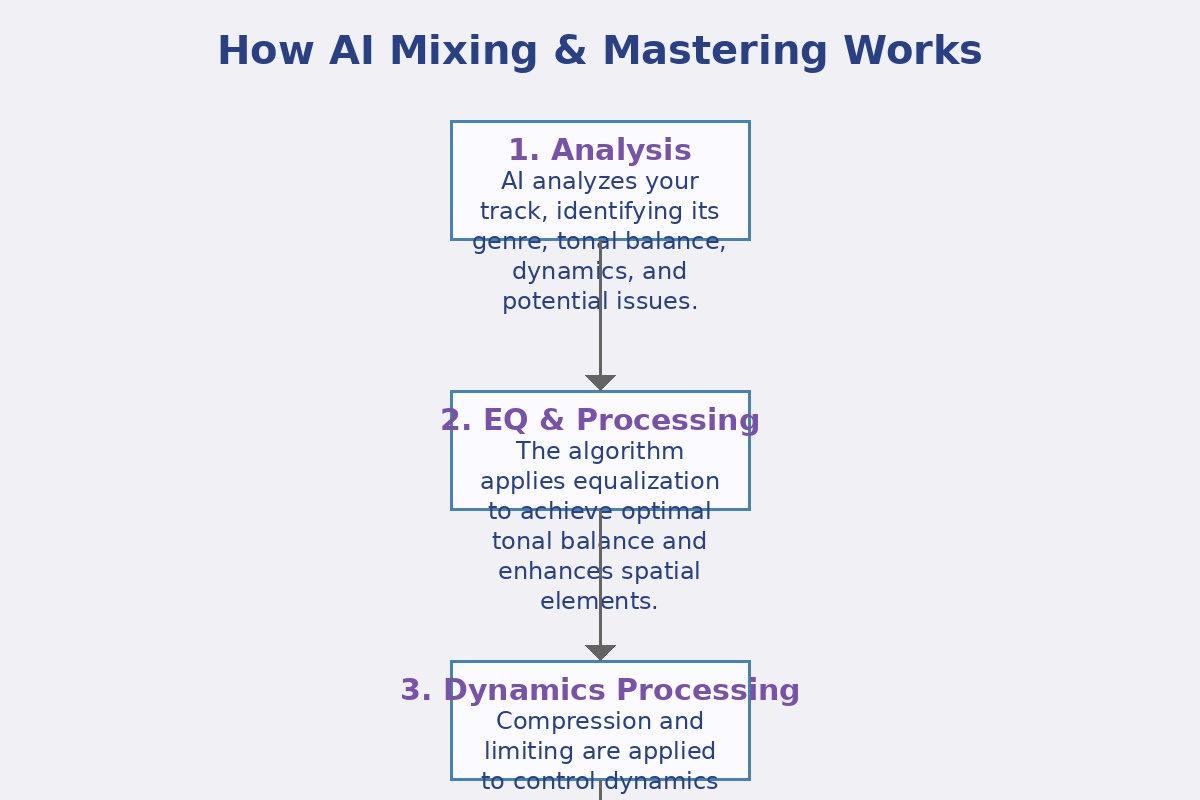
How AI Mixing & Mastering Works

How AI Mixing & Mastering Works

Understanding the technology behind intelligent audio enhancement.

AI mixing and mastering involves a sophisticated process that analyzes your audio and applies appropriate enhancements. Most modern systems use machine learning models trained on thousands of professionally mixed and mastered tracks to understand what makes a recording sound "professional."

AI Mixing & Mastering Process

1. Audio Analysis

The AI analyzes your track, identifying elements like frequency content, dynamic range, stereo image, and tonal balance. It also detects individual instruments and vocals, understanding how they interact within the mix.

2. Reference Comparison

Your track is compared to a database of professionally mixed and mastered reference tracks in similar genres. The AI identifies differences between your track and the reference material in terms of spectral balance, dynamics, and other audio characteristics.

3. Processing Application

Based on the analysis and comparison, the AI applies appropriate processing to enhance your track. This typically includes equalization to balance frequencies, compression to control dynamics, stereo enhancement, and loudness optimization.

4. Final Output

The processed track is rendered at your desired quality level. Most platforms allow you to export in high-resolution formats suitable for distribution on streaming platforms, CD production, or vinyl mastering.

Comparing Top AI Mixing & Mastering Tools

Find the right tool for your audio enhancement needs.

With several AI mixing and mastering tools available, it's important to understand their strengths, limitations, and use cases. We've compared the leading tools to help you choose the one that best fits your production workflow and sonic goals.

Tool Best For Free Tier Genre Adaptation Sound Quality Customization Export Options
Compeller.ai All-in-one audio enhancement Yes (Forever) Excellent ★★★★★ ★★★★★ WAV, MP3, FLAC
LANDR Quick mastering Limited Very Good ★★★★☆ ★★★☆☆ WAV, MP3
iZotope Ozone Professional mastering No Excellent ★★★★★ ★★★★★ All formats
eMastered Streaming optimization Limited Good ★★★★☆ ★★★☆☆ WAV, MP3
Soundraw Music generation with mastering Yes Good ★★★★☆ ★★★☆☆ WAV, MP3
MixGenius Detailed mixing Limited Very Good ★★★★☆ ★★★★☆ WAV, MP3, FLAC

Top AI Mixing & Mastering Tools

Detailed reviews of the best AI audio enhancement tools available today.

Compeller.ai

Compeller.ai

Our top recommendation for comprehensive audio enhancement. Compeller.ai offers an all-in-one solution that includes both mixing and mastering capabilities with exceptional genre adaptation.

  • Advanced AI audio analysis
  • Genre-specific processing
  • Extensive customization options
  • Forever free account available
  • Intuitive user interface
Try Compeller.ai
LANDR

LANDR

One of the pioneers in AI mastering, LANDR offers a streamlined approach to enhancing your tracks with a focus on quick results and streaming platform optimization.

  • Fast processing times
  • Streaming service optimization
  • Basic style controls
  • Limited free tier
  • Distribution services available
Try LANDR
iZotope Ozone

iZotope Ozone

A professional-grade mastering suite with AI-powered features that offers exceptional control and quality for serious producers and engineers.

  • Professional-grade quality
  • Extensive manual controls
  • AI-assisted starting points
  • Plugin integration with DAWs
  • Advanced metering tools
Try iZotope Ozone
eMastered

eMastered

A user-friendly AI mastering platform designed specifically for independent artists looking to achieve competitive loudness and clarity for streaming platforms.

  • Streaming-optimized presets
  • Reference track comparison
  • Simple interface
  • Limited free tier
  • Fast turnaround times
Try eMastered

Tips for Getting the Best Results from AI Mixing & Mastering

Maximize the quality of your AI-enhanced audio with these expert tips.

1

Start with Good Source Material

Even the best AI tools can't fix fundamental recording issues. Ensure your tracks are recorded cleanly, without clipping, excessive noise, or phase problems. The better your source material, the better the AI results will be.

2

Leave Headroom in Your Mix

Don't push your levels too high before sending to AI mastering. Aim for peaks around -6dB to -3dB, giving the AI enough headroom to work with for optimal dynamic processing.

3

Choose the Right Genre

Most AI tools allow you to specify a genre or reference style. Be specific about your genre to ensure the AI applies appropriate processing for your music type. The more accurate your genre selection, the better the results.

4

Compare Multiple Versions

Generate several versions with different settings or intensity levels. AI processing has some variability, and you might discover that a slightly different approach better suits your track's specific needs.

5

Listen on Multiple Systems

Evaluate your AI-processed tracks on different playback systems—studio monitors, headphones, car speakers, and consumer devices. This ensures your enhanced audio translates well across various listening environments.

6

Consider Stem Processing

For more control, some AI tools allow you to process individual stems (vocals, drums, bass, etc.) separately before combining them. This approach can yield more refined results than processing a full mix.

Enhance Your Sound with Compeller.ai

Transform your music with professional-quality mixing and mastering using the most advanced AI audio technology. Get started with a forever free account and elevate your sound today.

Try Compeller.ai Free
Try Free